Laptop

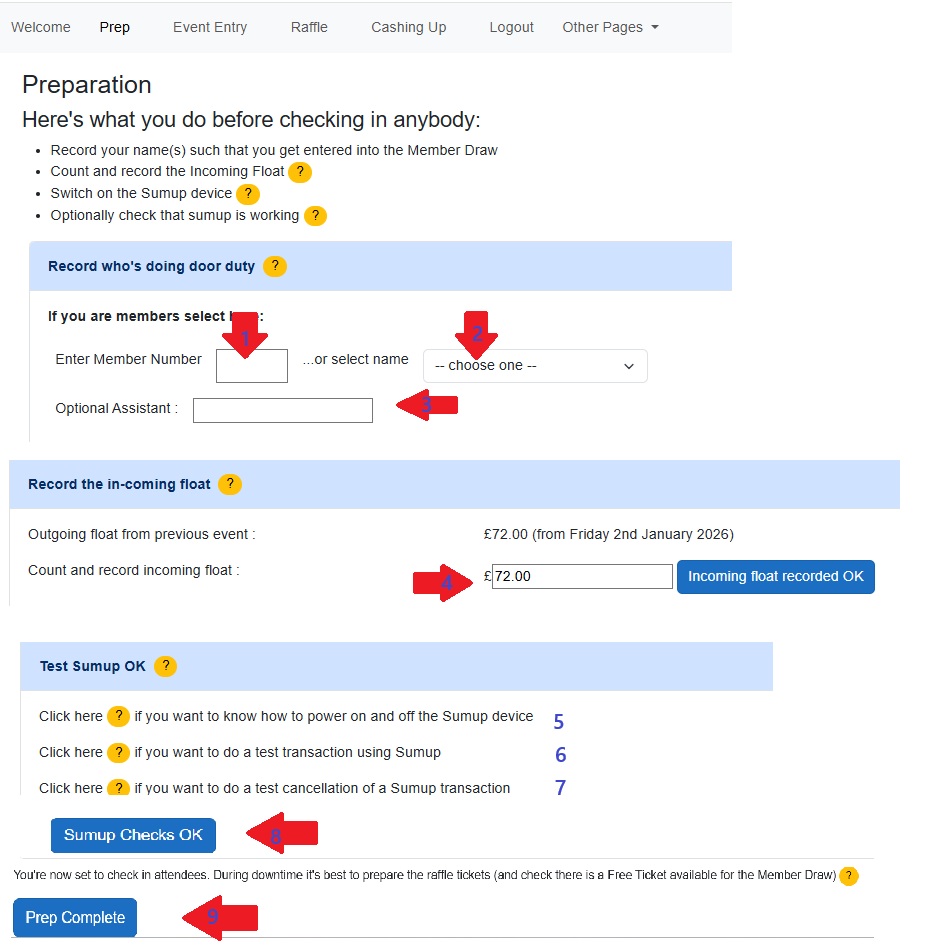
Note: The blue bands are what they call accordion controls - they expand. I have shown them all expanded. In practice it is 1 at a time.

The numbers below refer to the numbers associated with the red arrows

  1. 1 and 2 Enter either your member number or select your name from the dropdown list
  2. Enter the name of the assistant
  3. The previous week's float should be carried forward. Count the float - it should match. (if it doesn't put the counted float in here and leave a note when you publish the cash report - under Cashing Up)
  4. Click the orange Help to see how to power the Sumup machine on/off
  5. If you are nervous about the sumup machine maybe not working, you can do a test transaction of £1. Re-imburse yourelf £1 from the float and enter this as a Cashback (under Other Pages)
  6. You can do a test cancellation of the sumup payment. This will NOT take £1 from your acount
  7. All Sumup checks done (if you're confident you can skip 5,6,7)
  8. You are now ready to admit arrivees