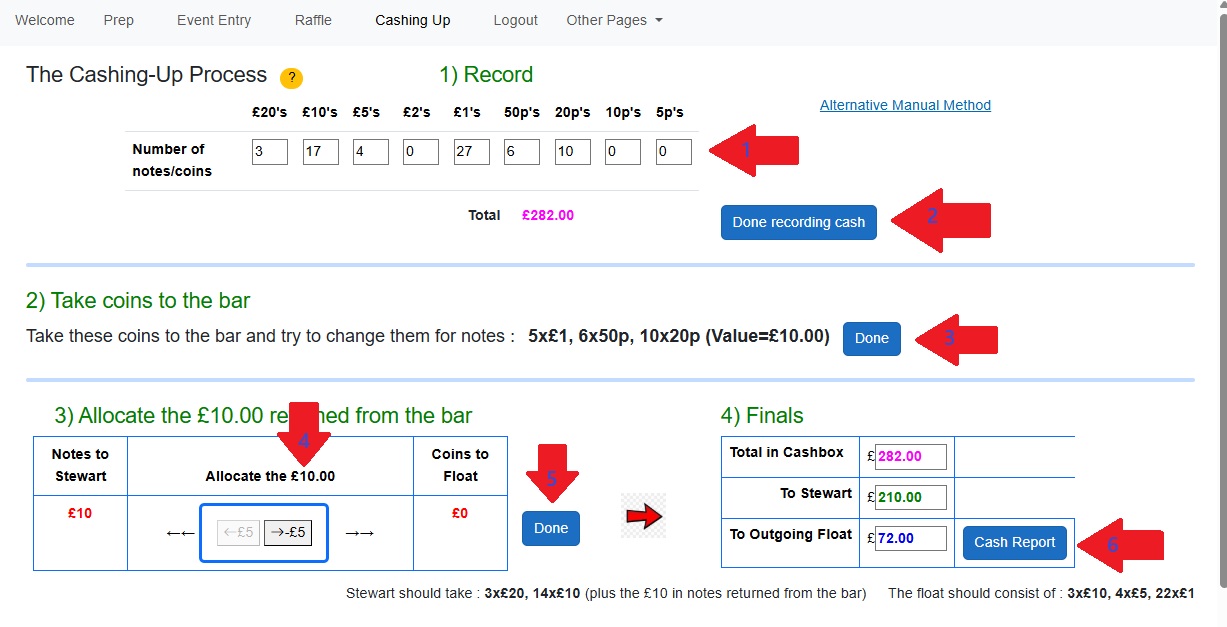
The various sections of this page (ie at the blue horizontal dividers) become visible as you progress through the page
The numbers below refer to the numbers associated with the red arrows
- Enter the quantities of each denomination. The total is a running total
- When you're done recording the denominations, select this
- It then calulates what you should take to the bar to try and exchange for notes. When you return from the bar, select 'Done'
- You now have some notes and maybe some cash. Using the left and right arrows, allocate the notes to Stewart and the coins to the float
- When you've decided notes/cash select 'Done'. This shows you the summary (which you can edit if you are not happy with it)
- This transfers you to the 'Publish' page which formats this summary. On the Publish page, select to email it to Carsten